





Blog
How AI Content Saves 70% of Time for Holiday Small Businesses

Introduction
The number one reason small businesses fail to capitalize on the holiday rush is not a lack of ideas; it is a lack of bandwidth.
In December, a founder is simultaneously the CEO, the shipping manager, the customer support agent, and the creative director. The mental cost of “Context Switching”, jumping from packing a box to writing a witty Instagram caption, destroys productivity.
Most advice says, “Hire a Virtual Assistant.” But onboarding a human takes weeks.
Our approach is to deploy an AI Content Force Multiplier.
By automating the “low-leverage” tasks (resizing, scheduling, tagging) and accelerating the “high-leverage” tasks (ideation, drafting, visual synthesis), you can mathematically compress a 40-hour marketing workweek into a 12-hour “Sunday Sprint.”
This guide breaks down the exact small business AI workflow to reclaim 70% of your time while increasing output quality.
The “Context Switching” Tax: Why You Are Exhausted
Every time you stop packing an order to open Instagram, you lose 20 minutes of cognitive focus. This is the “Switching Tax.”
In December, this tax bankrupts your energy.
The Manual Workflow (The Trap):
- Monday 9 AM: “I need to post something.” (Panic).
- Monday 9:15 AM: Stare at blank Canva screen.
- Monday 10:00 AM: Write a caption. Delete it. Rewrite it.
- Monday 10:30 AM: Post. Realize you forgot the hashtags.
- Result: 90 minutes for one piece of content.
The AI Workflow (The Liberation):
- Sunday 1 PM: “AI, generate 5 concepts based on my ‘Monsoon’ theme.”
- Sunday 1:15 PM: “Midjourney, generate the visuals.”
- Sunday 2:00 PM: “Make.com, schedule these for the week.”
- Result: 60 minutes for seven pieces of content.
The 70% AI Content Formula: Where the Time Goes
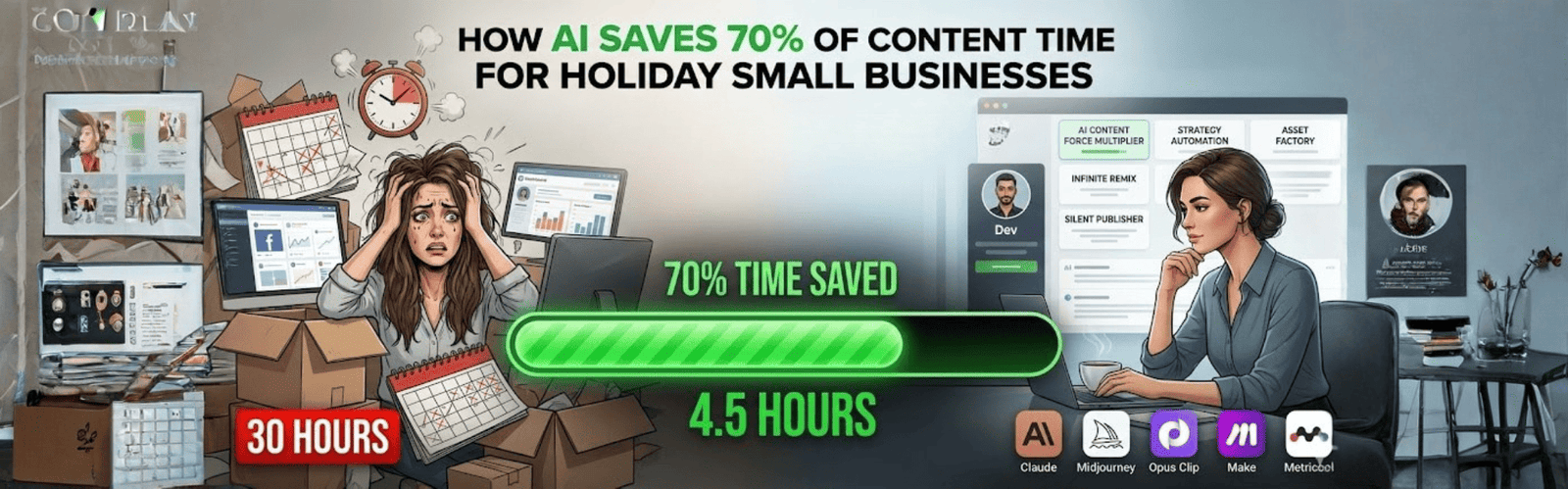
How do we justify the “70% savings” claim? Let us look at the math of a standard holiday campaign.
| Task | Manual Time (Hrs) | AI-Assisted Time (Hrs) | Savings |
| Ideation | 4.0 | 0.5 (Claude) | 87% |
| Visual Creation | 10.0 (Shooting/Editing) | 2.0 (Midjourney) | 80% |
| Copywriting | 5.0 | 0.5 (ChatGPT) | 90% |
| Video Editing | 8.0 | 1.0 (Opus/Runway) | 87% |
| Scheduling | 3.0 | 0.5 (Metricool/Buffer) | 83% |
| Total | 30 Hours | 4.5 Hours | ~85% |
Even with a margin for error and “human polish,” saving 70% is a conservative estimate. The key is using AI tools to reduce content workload, specifically in the Creation phase.
Phase 1: The “Mega-Batch” Ideation (AI Content Automation)
Stop thinking daily. Start thinking weekly.
We use Recursive Prompting to generate high-quality ideas that align with your brand voice.
The “Brand Bible” Upload
Do not start from scratch.
Upload a PDF of your “Brand Voice” (e.g., “Dev: Minimalist, Mumbai-based, Vlogger aesthetic”) to Claude 3.5 Sonnet Projects or a custom ChatGPT GPT.
The Prompt:
“Based on my Brand Bible, generate 12 distinct content ideas for the week of Dec 10-17.
Context: This is the ‘Shipping Deadline’ week.
Goal: Create urgency without anxiety.
Format: 4 Reels (Educational), 4 Static (Aesthetic), 4 Stories (Interactive).
Constraint: No clichés. Focus on the ‘Monsoon Christmas’ vibe.”
The Output:
In 30 seconds, you have a strategic roadmap. No staring at a blank page.
Phase 2: The “AI Content Asset Factory” (Creation Automation)
This is where the heavy lifting happens. Holiday content automation tips usually focus on text, but visuals are the time-killer.
Visual Batching with Midjourney Permutations
Instead of typing one prompt at a time, use Permutations to generate variations instantly.
The Prompt:
Cinematic flat lay of [Product] on a {velvet sofa, rustic wooden table, snowy windowsill, marble counter}. Holiday lighting, sharp focus, 35mm film grain 4:5.
- The Magic: Midjourney recognizes the {} brackets and runs four separate jobs simultaneously. You get coffee. When you come back, you have sixteen professional photos ready to curate.
Copy Batching with Spreadsheets
- Ask ChatGPT to output the captions for your twelve ideas in a CSV Table format.
- Columns: Hook, Body, CTA, Hashtags.
- Copy this table into Google Sheets.
- You now have your “Copy Database” ready for the automation tools.
Phase 3: The “Infinite Remix” (Repurposing AI Content Automation)
The smartest festive marketing automation ideas involve turning one asset into five.
Do not create for every platform. Create for one and let AI mutate it.
The “Opus Clip” Workflow (Long to Short)
- Input: Record one 10-minute video of yourself (Dev) talking about “The Art of Gifting.”
- Tool: Upload to Opus Clip.
- AI Action: It automatically analyzes the video, finds the five most “viral” moments, cuts them into vertical 9:16 clips, adds dynamic captions, and gives them a “Virality Score.”
- Time Saved: 4 hours of editing turned into 10 minutes of review.
The “Image to Video” Workflow (Static to Motion)
- Input: Your top-performing static photo from last week.
- Tool: Runway Gen-3 or Luma.
- AI Action: Animate the snow/rain/lighting.
- Output: A fresh “Video Ad” without shooting new footage.
Phase 4: The “Silent Publisher” (AI Content Distribution Automation)
You should not be logging into Instagram on Christmas Eve.
Use Make.com (formerly Integromat) or Zapier to build a “Headless Publishing System.”
The “Airtable to Social” Pipeline
- The Hub: You put your Final Images and Final Captions into an Airtable base.
- The Trigger: You change a status drop-down from “Draft” to “Ready.”
- The Automation (Make.com):
- Watch Airtable records.
- If “Ready” -> Send to Buffer / Metricool.
- Schedule for the date listed in the “Date” column.
- The Result: You approve content on Sunday. The machine posts it on Wednesday, Thursday, and Friday while you are sleeping.
The Tech Stack: The AI Content Efficiency Suite
Here is the exact stack to achieve the small business AI workflow.
| Function | Tool | Cost | Why? |
| Brain | Claude 3.5 Sonnet | $20/mo | Best nuance for strategy and writing. Less “robotic” than GPT-4. |
| Visuals | Midjourney | $30/mo | Highest fidelity. “Stealth Mode” keeps prompts private. |
| Remix | Opus Clip | $19/mo | best-in-class automatic video editing. |
| Scheduler | Metricool | Free/$18 | Great analytics + auto-posting features. |
| Glue | Make.com | Free | Connects the spreadsheet to the scheduler. |
Quality Control in AI Content Automation
The danger of how to automate Christmas ads is that you might automate a mistake.
The “Human-in-the-Loop” Rule:
Never let AI post directly without a “Glance Check.”
- Setup: Have your automation send a notification (Slack/Email) saying “Post Ready for Approval.”
- The Check: Look at the hands (AI struggles). Look for “Hallucinated” discounts (Did it say 50% off when you meant 20%?).
- Time Cost: 30 seconds per post.
- Value: Prevents PR disasters.
FAQ: Maintaining the “Human Touch”
Q1: If I automate everything, won’t I lose connection with my audience?
A: You automate the content, not the conversation.
Because you saved 25 hours on creating posts, you now have 25 hours to reply to comments, answer DMs, and record personal “Thank You” videos. Automation increases your capacity for humanity.
Q2: Does the algorithm punish scheduled/AI content?
A: No. The algorithm punishes boring content. It does not care if it was scheduled via API or posted manually. If the engagement is high (because the content is good), the reach will be high.
Q3: Can I automate the “Engagement” (Liking/Commenting)?
A: Do not do this. Automated “Nice pic!” bots get you shadow-banned. Use AI to create the post, but use your thumbs to interact with the community.
Conclusion: The Time Billionaire
In December, time is more valuable than money.
If you can buy back 25 hours a week for $50 in software subscriptions, that is the highest ROI investment you will ever make.
The goal of AI is not just to “do more.” It is to do the important things—the strategy, the customer care, the creative direction—while the machines manage the pixel-pushing.
This holiday season, do not be a busy shopkeeper. Be a calm Director.
Bonus: The “AI Content Automation” Prompt Pack
1. The “Caption Batcher” (Claude)
“I have these 5 images [Describe images]. Write 5 Instagram captions.
Style: Short, punchy, lowercase aesthetic.
Structure: Hook -> Vibe -> Call to Action.
Format: Output as a Markdown table.”
2. The “Email Sequence Architect” (ChatGPT)
Write a 3-part automated email sequence for anyone who abandons their cart this week.
Email 1 (1 hr later): Helpful check-in.
Email 2 (24 hrs later): Social proof/Story.
Email 3 (48 hrs later): Scarcity (Stock low).
Tone: Helpful, not annoying.”
3. The “Video Script Remix” (Claude)
“Take this blog post I wrote [Paste Text]. Extract three scripts for 30-second TikTok videos. Highlight the most controversial/surprising sentence as the visual hook.”