


Blog
AI Product Visual Direction: Creating High-Converting Holiday Images


Introduction
For the last decade, the gold standard of e-commerce photography was the “Amazon Standard”: a product isolated on a pure white background (#FFFFFF), brightly lit, and devoid of soul.
In Holiday 2025, that standard is dead.
With the saturation of digital ads, the human eye has developed a filter for sterility. We scroll past perfection. We stop for Texture, Shadow, and Story.
If you are a small brand, you cannot compete with Amazon on “Cleanliness.” You must compete on “Vibe.”
This guide is how to generate AI product visual images. It is about how to function as an AI Art Director. We will explore how to use tools like Midjourney v7, Flux, and Photoshop Generative Fill to take your existing product (whether a physical candle or a digital storytelling kit) and place it inside a cinematic, high-emotion holiday narrative. We will cover lighting theory, composition hacks, and the specific “Social Scion” aesthetic that converts attention into revenue.
The Psychology of “AI Product Visual Hunger” in 2025
Why do some images make us click “Add to Cart” while others feel cheap? It comes down to Neuro-Aesthetics.
The “Touch” Deficit
Shopping online deprives the brain of haptic feedback (touch). We cannot feel the weight of the fabric or the smoothness of the glass.
To compensate, successful AI product visuals for ecommerce must utilize Visual Tactility.
- The Goal: The viewer must be able to “feel” the image with their eyes.
- The AI Prompt Strategy: We don’t just ask for “a table.” We ask for “scratched oak wood with a coffee ring stain.” We don’t ask for “lighting.” We ask for “dust motes dancing in a shaft of warm tungsten light.”
The Nostalgia Loop
As discussed in previous blogs, 2025 is the year of “Safety.”
Consumers are seeking images that trigger memories of a simpler time.
- The Shift: Away from “Studio Minimalist” (Apple Store vibe).
- Toward: “Grandma’s Attic” or “The Cozy Den” (Kinfolk vibe).
- Key Elements: Imperfection, grain, clutter, and warmth.
Defining Your AI Product Visual Token
Before you generate a single pixel, you must define your “Visual Token.” This is the unique visual signature that tells a user “This is Dev/Social Scion” before they read the logo.
The Components of a Visual Token
- The Camera: 2025 trends favor the “35mm Film” look over the “4k Digital” look.
- Keywords: Kodak Portra 400, Grain, Halation, Soft Focus.
- The Environment: Where does your brand live?
- Social Scion Context: Mumbai. Monsoon. Concrete. Balconies. High-rise lights.
- The Lighting Ratio: High contrast.
- Keywords: Chiaroscuro, Volumetric Lighting, Deep Shadows.
Lighting Theory: Why “Perfect” is Boring
Most beginners use AI to create “Softbox Lighting.” This flattens the product.
To create high-converting holiday product images, you need to master dramatic lighting.
The Three-Point Lighting Setup (AI Edition)
Even in AI, we simulate real-world physics.
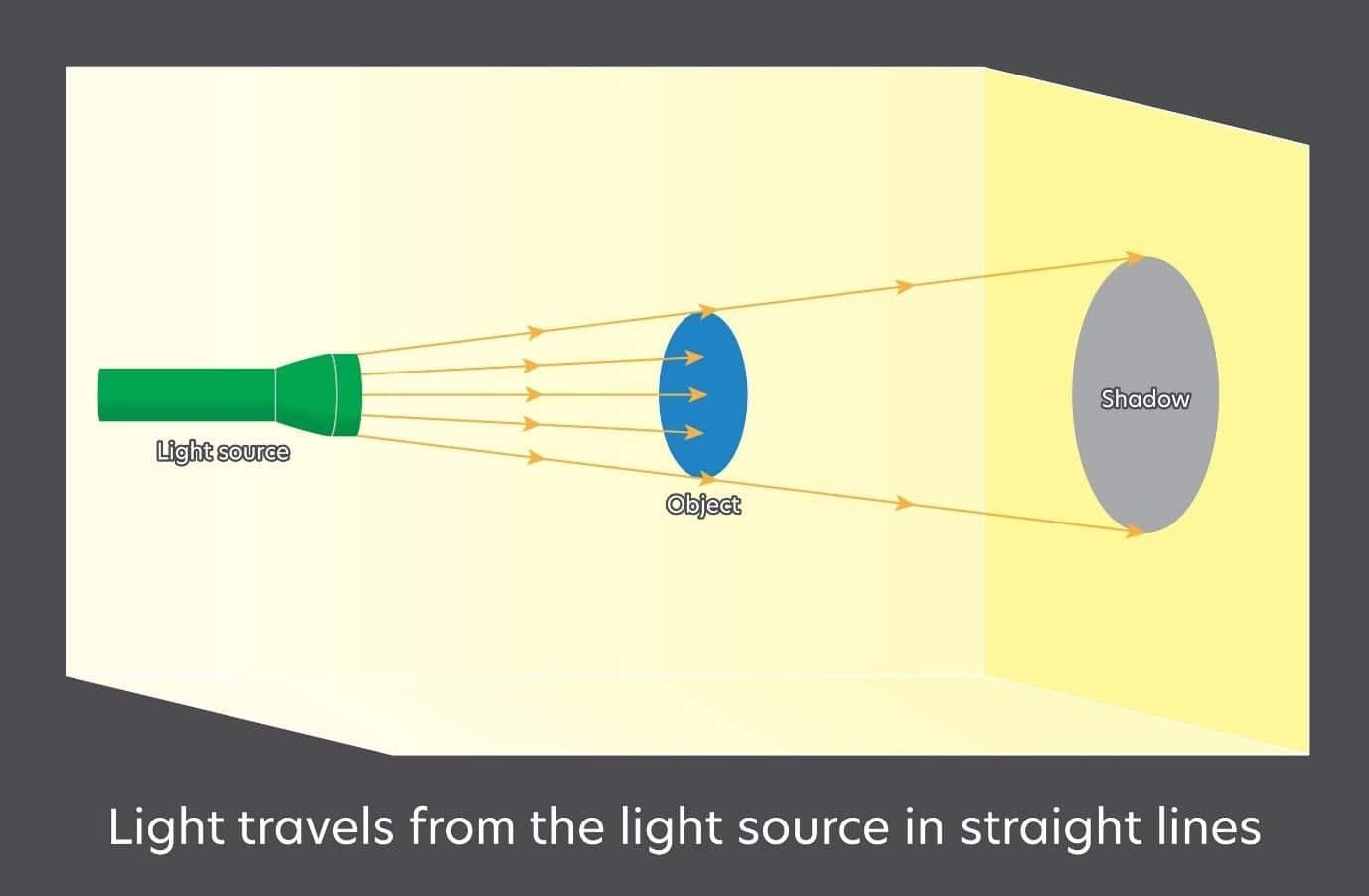
Shutterstock
- Key Light: The main source. In our holiday style, this should be motivated by a “natural” source (e.g., a fireplace or a window).
- Prompt: “Key light coming from a warm fireplace on the right.”
- Fill Light: Softens the shadows. In 2025, keep this low to maintain drama.
- Prompt: “Low fill, high contrast shadows.”
- Back Light (Rim Light): Separates the product from the background.
- Prompt: “Cool blue rim light hitting the edge of the product.”
Holiday Specific Lighting Cues
- The “Bokeh” Effect: Using Christmas lights in the background to create glowing orbs.
- Prompt: “Background is a Christmas tree out of focus, creating creamy bokeh orbs. Colors: Amber and Gold.”
- The “Gobo” Effect: putting a stencil in front of the light to cast shadows (e.g., window blinds).
- Prompt: “Shadows of window blinds cast across the product.”
AI Product Visual Tech Stack: Beyond Basic Prompting
You cannot do this with ChatGPT alone. Here is the professional AI lighting & composition tips stack.
| Tool | Role | Why We Use It |
|---|---|---|
| Midjourney v6.1 / v7 | The Generator | Best-in-class texture and lighting. The engine of the operation. |
| Flux (Pro/Dev) | The Text Handler | Flux handles text on packaging better than Midjourney. Use this for mockups. |
| Photoshop (Gen Fill) | The Compositor | To place your real product into the AI background. |
| Magnific AI | The Upscaler | Adds microscopic detail (skin pores, paper grain) to make it look non-AI. |
| Photoroom | The Isolator | Removes the white background from your raw product photo. |
Step-by-Step AI Product Visual Workflow
This is the secret workflow used by top agencies to create Christmas mockups AI product visual without shooting on location.
Phase 1: The Raw Asset
Take a photo of your product (e.g., The “Christmas Storytelling Kit” printed out, or a physical candle) on a plain white table. Use your phone. Ensure the lighting is flat/even.
- Action: Use Photoroom or iOS “Lift Subject” to remove the background. You now have a transparent PNG of your product.
Phase 2: The Scene Generation (Midjourney)
Generate the “stage” without the product.
- Prompt: “A close up macro shot of a rustic wooden table surface. In the background, a cozy living room with a lit fireplace and a blurred Christmas tree. On the table, there are scattered pine needles, a cinnamon stick, and a vintage brass pen. There is an empty space in the center. Cinematic lighting, photorealistic –ar 4:3”
Phase 3: The Composite (Photoshop)
- Open the AI-generated “Stage” in Photoshop.
- Drag and drop your Product PNG into the “Empty Space.”
- The Magic Step: Select the area around the bottom of your product where it touches the table.
- Click “Generative Fill” and type: “Contact shadows, blend product into table.”
- Photoshop will generate the realistic shadows and reflections that ground the object.
Phase 4: The Harmony Pass
Add a “Color Lookup” adjustment layer over the entire image (Product + Background) to unify the color grading. This ensures the product doesn’t look “pasted on.”
Advanced Composition: Breaking the Grid
Don’t just center the product. Use Festive product photography guide principles to guide the eye.
The “Rule of Odds”
The human brain prefers odd numbers.
- Setup: If you are photographing 1 product, place 2 props next to it (Total = 3 items).
- Props: Dried orange slices, vintage scissors, ribbon, star anise.
The “Negative Space” for Text
If this image is for an Instagram Story, you need empty space at the top or bottom for text.
- Prompt: “Composition utilizing negative space in the upper third. The product is anchored in the lower third.”
The “POV” (Point of View)
The most immersive angle.
- Prompt: “First person POV looking down at a pair of hands holding the [Product] over a lap. The person is wearing thick wool socks and jeans. Cozy vibe.”
Holiday Color Theory: The “Anti-Red-and-Green” Palette
Red and Green is cliché. It signals “Cheap Discount Store.”
For a premium “Social Scion” look, use Analogous Palettes.
Palette A: “Midnight Mass” (Luxury)
- Colors: Deep Navy, Charcoal, Gold, Emerald.
- Mood: Expensive, serious, evening.
- Use Case: High-ticket items, Storytelling Kits.
Palette B: “Spiced Latte” (Warmth)
- Colors: Terracotta, Beige, Cream, Burnt Orange.
- Mood: Cozy, organic, safe.
- Use Case: Home goods, candles, wellness.
Palette C: “Mumbai Winter” (Brand Specific)
- Colors: Slate Grey, Rainy Blue, Neon Amber (Streetlights).
- Mood: Urban, melancholic, cool.
- Use Case: Dev’s personal brand merchandise (Hoodies).
Prompting for Color:
“–no red, green” (Negative prompt)
“Color Palette: Slate Grey and Amber Gold. Tonal harmony.”
Troubleshooting: Fixing AI Hands and Text
Problem: Midjourney still struggles with hands (6 fingers) and specific text on labels.
Solution: The Hybrid Workflow.
The Hand Fix
- Generate the image with the person holding the object.
- If the hand is weird, use Photoshop Generative Fill. Circle the hand. Prompt: “A realistic human hand holding a box, 5 fingers, knuckles visible.”
- Alternatively, photograph your own hand holding the object, and composite it in.
The Text Fix
Never rely on AI to generate your logo on a shirt or box.
- Generate the shirt blank.
- Use a “Displacement Map” in Photoshop to wrap your flat Logo PNG around the curves of the fabric.
- This looks 100% real, unlike a flat overlay.
FAQ AI Product Visual: Legal & Technical
Q1: Can I use AI images for Facebook Ads?
A: Yes. Meta actually encourages it. However, avoid using celebrities or trademarked logos (like Nike) in your background props.
Q2: What resolution do I need?
A: Midjourney defaults to 1024×1024. This is fine for Instagram. For a Website Hero Banner, you must use an Upscaler like Magnific AI or Topaz Gigapixel to get to 4k resolution without pixelation.
Q3: How do I keep the character (Dev) consistent?
A: Use the Character Reference (–cref) tag in Midjourney.
- Upload a reference photo of Dev.
- Add –cref [URL] to your prompt.
- Add –cw 100 (Character Weight) to keep the face and outfit identical.
Q4: Should I use “Raw” mode?
A: Yes. –style raw reduces the “AI aesthetic” (the shiny, plastic look) and creates a more photographic, candid feel.
Conclusion: You Are The Director
In 2025, you are no longer limited by your camera gear or your studio space. You are limited only by your Taste.
The brands that win this holiday season won’t be the ones with the cleanest white backgrounds. They will be the ones that transport the customer into a world—a world that feels warm, expensive, and slightly magical.
Stop taking photos of products. Start taking photos of stories.
Bonus: AI Product Visual Prompt Pack (Copy-Paste)
1. The “Luxury Flat Lay”
“Overhead flat lay, [Product] in center. Surroundings: Dark slate stone surface, scattered dried botanicals, minimal props. Lighting: Single shaft of window light from top left (Chiaroscuro). High contrast, sharp texture. –ar 4:5 –style raw”
2. The “Cozy Vlogger”
“POV shot, holding [Product] in left hand. Background: Out of focus Christmas market at night, bokeh lights. Weather: Light snow/rain mix. Hand is wearing a knitted fingerless glove. Street photography style. –ar 9:16”
3. The “Product Reveal” (Video Motion)
“Cinematic slow pan across the texture of [Product]. Macro lens. The lighting shifts from shadow to light, revealing the logo. Golden hour lighting.” (Use in Runway)